While working on my previous blog post documenting my exploits with implementing Gerstner waves in my unreleased game, I came to a very frustrating realization about WordPress’ official code block: it doesn’t support syntax highlighting.
I was thoroughly impressed with the math block that was included, and I hadn’t even heard of MathML before then, so seeing that they made this math block that could translate LaTeX syntax into beautifully-rendered math using nothing but standard MathML markup, but they didn’t have syntax highlighting available for even the most common programming languages in their code block, that just doesn’t feel right.
How I Did It Before
I had used a syntax highlighting plugin based on a JavaScript-based code viewing/editing library called CodeMirror years ago, and I still had it installed in this blog at that time, so I decided to try that. And it was fully broken, like surprisingly unusable and unreadable. So that was a no go. Sure enough, the plugin hadn’t seen an update in years, and I uninstalled it. And also it meant that I needed to add to my task list the conversion of any previous blog posts that had used that broken plugin.
Then I decided to browse the plugins that were available through the plugin marketplace in wordpress. I came away from this very unsatisfied and without installing anything to solve this issue.
The problem is that I really didn’t like either of the two approaches that these plugins all fell into, and I had a better idea for the approach I actually was hoping for.
The Oldest Approach: Client-Side Rendering
The first type of syntax highlighting plugin, and the one that’s been around for the longest time, are the ones that pull in a whole huge JavaScript library that reads the code block on the frontend on the users’ devices, parses it there, and then renders it.
This approach has a massive downside: it requires loading massive amounts of JavaScript on the order of hundreds of kilobytes to megabytes, and then once it downloads, it has to initialize a massive complex user interface that involves parsing, rendering, and often a whole slew of features that you really don’t need, but were built into the javascript library because of course they were.
There’s a minor benefit to these for a very specific approach, and that’s that this approach actually allows you to actually provide the code blocks as editable text that will properly highlight any changes users make to the code. Is this useful for presenting code in a blog post? I don’t think so. Honestly, even if it did, if it were me reading, I’d still probably just copy the code into my own IDE so I could use my own tooling. So honestly, I’m not sure why you’d need that functionality, but if you do, then maybe one of these types of plugins is really your best bet.
The Better Approach: Server-Side Rendering
The second type of syntax highlighting plugin that I came across was a slight evolution on this, seemingly driven by exactly the same load time concerns that I had about the heavy JavaScript library types. These ones moved the syntax highlighting code to the backend, performing server-side rendering of the syntax-highlighted code in PHP, and rendering this into HTML.
Obviously this is a massive improvement from a user load time perspective. They no longer need to download a massive JavaScript library and wait for their device to parse a bunch of code and turn it into HTML. Now the PHP does that.
They can no longer edit the code in the web page, but I really don’t think anybody cares. And if the page is pulled up in the Wayback Machine in like 15 years, it’ll probably still look right.
There’s a new problem though. If you aren’t caching static HTML content somewhere, which WordPress doesn’t do out of the box, somebody is still having to do all of the parsing and HTML-generation work that the users’ browsers were doing before. And that person is now you. You’re now making PHP parse a bunch of random code in potentially a bunch of random languages every single time somebody loads the page. If your server sucks, it actually could still be just as slow as it was with the JavaScript library, or slower even. If enough users try to load your blog at a time, you could actually run out of PHP-FPM workers and your website will slow or error out for everybody.
Of course, if you’re hosting anything you plan to scale, you’re definitely going to have some kind of content cache. You can even get the open source caching plugin from the creators of WordPress themselves: WP Super Cache. So really, with even a slightly rigorous setup, you’re not actually re-rendering the same page every time somebody views it. But you still are re-rendering it often. Any time your cache detects some different variation, or the cache expires, or you view it while logged in, or whatever else might bypass the cache.
My Suggested Approach: Editor-Side Rendering
Parsing languages is still kind of a complex, algorithmically-complex task that I wouldn’t recommend running in PHP at all, let alone frequently. And when you think about it, what you’re really doing is creating a situation where you’re asking PHP to read the same content over and over again, and generate the same output over and over again. While this is certainly an improvement, shouldn’t it be possible to perform the parsing and syntax highlighting exactly once: when you’re editing the post? And wouldn’t doing it that way guarantee that whatever highlighting you see when you edit the post will be the same highlighting that people will see 10 years later? Yes. And I think that’s actually what we should be doing instead.
Tree-Sitter
My approach is that you should be able to run a parser in the blog post editor. A real parser, that uses real grammars, not some questionable chains of regex stuff. I wanted to use the Tree-Sitter library, since it’s a very well-designed parser that’s designed to work with real grammars in any language at all, and it has robust grammars written in just about every programming language to ever exist, so I’d be able to make use of any of those without having to write a single grammar myself, ever.
Lumis
I found a library called Lumis, which is written in Rust and built on top of Tree-Sitter, which is also written in Rust. It compiles down to WebAssembly, and they also have a JavaScript/TypeScript API that allows you to lazy-load those WASM modules and run the parsers with a really simple API. But Lumis isn’t just a parser, Lumis is specifically designed for syntax highlighting, so it specifically has the capability to output the code as HTML, wrapping the highlighted code in spans with classes that name what each part of the code is, and allows you to style it using a standard set of class names like you would if you wrote a CSS-based theme for VSCode. And they also have a ton of premade themes, which you can also easily pull in with an NPM package.
Introducing WitchFire
So I built a WordPress plugin that wraps this Lumis library, and creates a Gutenberg block that is mostly a drop-in replacement of the core code block, but adds syntax highlighting using this Lumis library. What makes this plugin special, though, is that it fits neither of those two aforementioned categories of syntax highlighting plugin. It highlights the code once: when you finish editing the block in the block editor. And it only ever parses it again if you change the code or force a re-parse again. The highlighted code is persisted as static HTML to the post content, so whether you cache page content or not, there’s absolutely no increased compute when serving the page content.
I named the plugin WitchFire, which is another word for the atmospheric physics phenomenon called St. Elmo’s Fire. It was frequently observed at nighttime on the edges of masts and rigging on sailing ships, showing strange, colorful, ethereal plasma light that was no doubt completely baffling to the people who first saw it long before modern science. I liked the colorful aspect to it, and the allusion magic, which is what this project feels like to me.
Showing It Off
To show it off, here’s a block of code rendered by the WitchFire plugin. This is the Edit function of the block itself, as of currently writing it. Pardon the messy code, I literally wrote this whole plugin in a day, on Thanksgiving no less. I’ll clean up the code as I get the features polished.
import { useCallback, useEffect, useMemo, useState } from '@wordpress/element';
import { useDispatch } from '@wordpress/data';
import { BlockControls, InspectorControls, PlainText, useBlockProps } from '@wordpress/block-editor';
import { ToolbarGroup, ToolbarButton, PanelBody, ComboboxControl, Notice } from '@wordpress/components';
import { __ } from '@wordpress/i18n';
import './editor.scss';
import { highlightCode, LANGUAGE_OPTIONS } from "./highlight";

const getTextFromHighlighted = ( highlightedCode ) => {
    const node = new DOMParser().parseFromString( highlightedCode ?? '', 'text/html' );
    return node.querySelector( 'pre' )?.innerText ?? node.body.textContent ?? '';
}

const Edit = ( {
    clientId,
    attributes: {
        code,
        language,
        highlighted
    },
    setAttributes
} ) => {
    const [ isPreviewEnabled, setIsPreviewEnabled ] = useState( false );
    const [ isHighlighting, setIsHighlighting ] = useState( false );
    const [ highlightError, setHighlightError ] = useState( null );

    const { lockPostSaving, unlockPostSaving } = useDispatch( 'core/editor' ) ?? {};
    const { __unstableMarkNextChangeAsNotPersistent } = useDispatch( 'core/block-editor' ) ?? {};

    const highlightedCode = useMemo( () => getTextFromHighlighted( highlighted ), [ highlighted ] )
    const isHighlightedCodeDirty = code !== highlightedCode;

    const updateHighlighting = useCallback( async () => {
        setIsHighlighting( true );
        try {
            const newHighlighted = await highlightCode( code, language );
            __unstableMarkNextChangeAsNotPersistent?.();
            setAttributes( { highlighted: newHighlighted } );
            setHighlightError( null );
            return true;
        } catch ( e ) {
            console.error( '[witchfire] highlighting failed:', e )
            setHighlightError( e );
            return false;
        } finally {
            setIsHighlighting( false );
        }
    }, [
        code,
        language,
        __unstableMarkNextChangeAsNotPersistent,
        setAttributes,
    ] );

    const enablePreview = useCallback( async () => {
        if ( !isHighlightedCodeDirty ) {
            setIsPreviewEnabled( true );
            return;
        }
        await updateHighlighting() && setIsPreviewEnabled( true );
    }, [
        isHighlightedCodeDirty,
        updateHighlighting
    ] )

    useEffect( () => {
        const lockKey = `reidrun-witchfire-highlight-${ clientId }`;

        if ( isHighlightedCodeDirty || isHighlighting ) {
            lockPostSaving?.( lockKey );
            return () => {
                unlockPostSaving?.( lockKey );
            }
        }

        unlockPostSaving?.( lockKey );
    }, [
        clientId,
        lockPostSaving,
        unlockPostSaving,
        isHighlightedCodeDirty,
        isHighlighting,
    ] )

    return (
        <>
            <BlockControls>
                <ToolbarGroup>
                    <ToolbarButton
                        isPressed={ !isPreviewEnabled }
                        onClick={ () => setIsPreviewEnabled( false ) }
                    >
                        { __( 'Edit', 'witchfire' ) }
                    </ToolbarButton>
                    <ToolbarButton
                        isPressed={ isPreviewEnabled }
                        disabled={ isHighlighting }
                        onClick={ enablePreview }
                    >
                        { isHighlighting
                            ? __( 'Highlighting...', 'witchfire' )
                            : __( 'Preview', 'witchfire' ) }
                    </ToolbarButton>
                    <ToolbarButton disabled={ isHighlighting } onClick={ updateHighlighting }>
                        { __( 'Update Highlighting', 'witchfire' ) }
                    </ToolbarButton>
                </ToolbarGroup>
            </BlockControls>
            <InspectorControls>
                <PanelBody title={ __( 'Witchfire Settings', 'witchfire' ) }>
                    { isHighlightedCodeDirty && (
                        <Notice status="warning" isDismissible={ false }>
                            { __( 'Saving is temporarily blocked. Code has been updated in a WitchFire code block, but highlighted code has not been updated. Click "Update Highlighting" to apply changes.', 'witchfire' ) }
                        </Notice>
                    ) }
                    { highlightError && (
                        <Notice status="error" isDismissible={ false }>
                            { __( 'WitchFire syntax highlighting failed. Check code for syntax errors, or switch to plaintext language.', 'witchfire' ) }
                        </Notice>
                    ) }
                    <ComboboxControl
                        label={ __( 'Language', 'witchfire' ) }
                        value={ language }
                        options={ LANGUAGE_OPTIONS }
                        onChange={ ( next ) => setAttributes( {
                            language: next ?? 'plaintext',
                            highlighted: ''
                        } ) }
                    />
                </PanelBody>
            </InspectorControls>
            <div { ...useBlockProps( { className: 'lumis' } ) }>
                { isPreviewEnabled
                    ? <div dangerouslySetInnerHTML={ { __html: highlighted } }/>
                    : (
                        <PlainText
                            value={ code }
                            onChange={ ( next ) => setAttributes( {
                                code: next,
                                highlighted: ''
                            } ) }
                            placeholder={ __( 'Enter code here', 'witchfire' ) }
                            aria-label={ __( 'Enter code here', 'witchfire' ) }
                            spellCheck={ false }
                        />
                    )
                }
            </div>
        </>
    );
}

export default Edit;
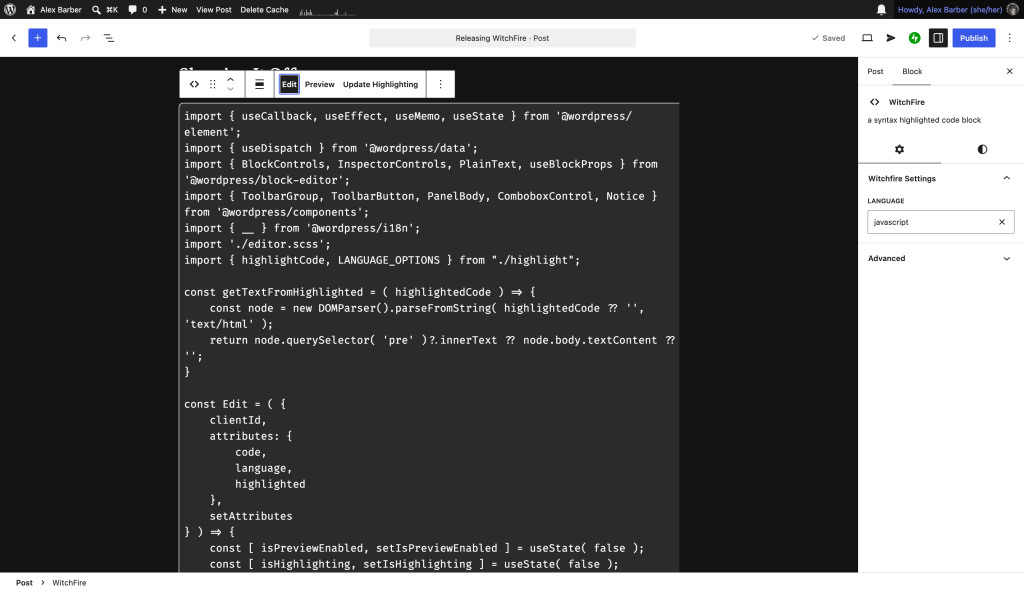
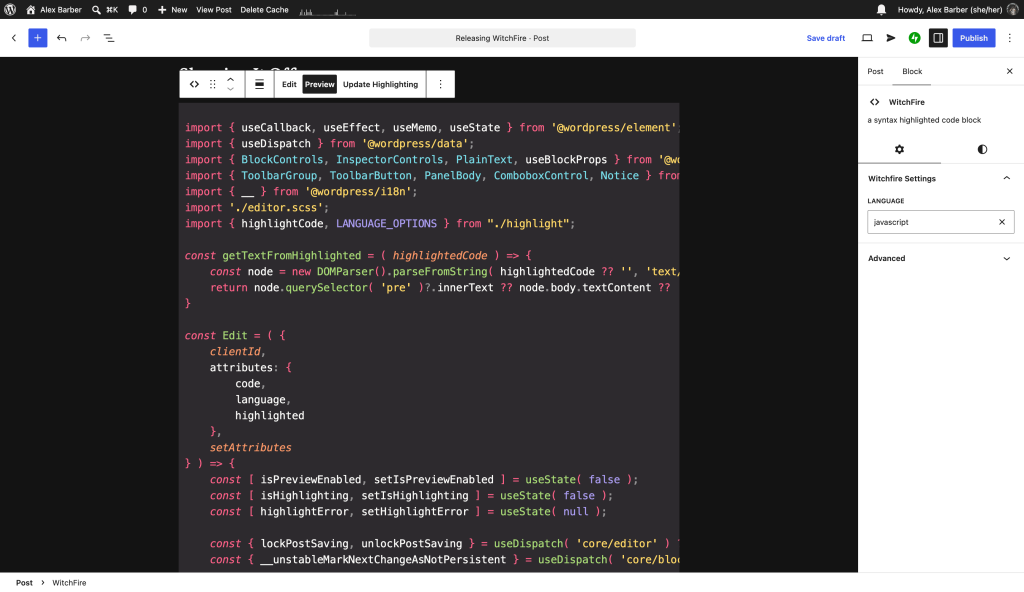
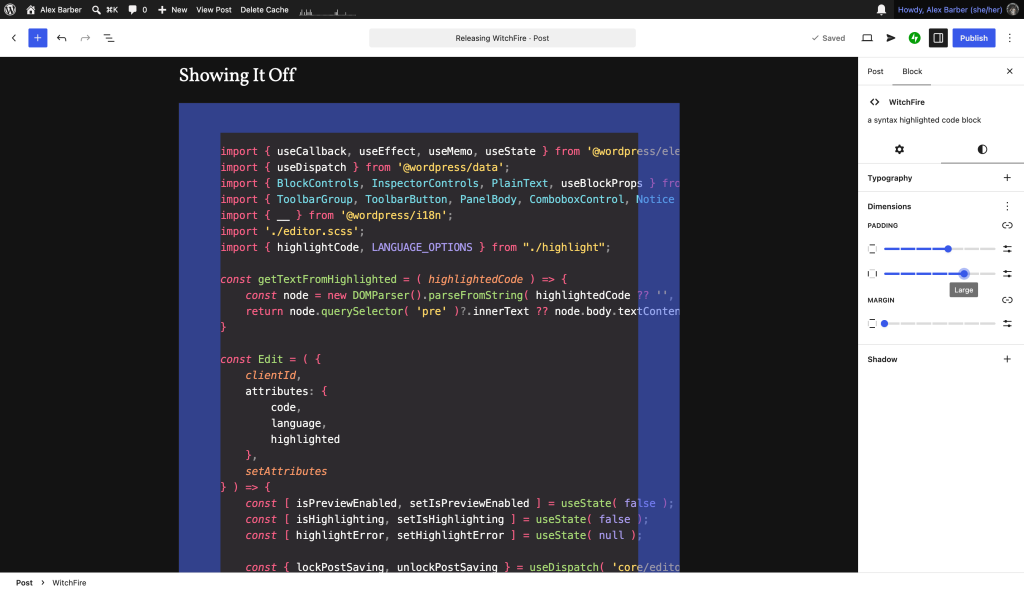
And I figure I should include a few screenshots so you can see what the experience is like from the editing side:
Where Can I Get It?
The source code is hosted on Codeberg here: https://codeberg.org/reidrun/witchfire
It is also mirrored to GitHub if you prefer that for some reason: https://github.com/reidrun/witchfire
I haven’t yet added a CI pipeline to make pre-built plugin zip files easily obtainable, but that’s something I plan to do, and when I do, I’ll update this post.
If you really want it in the mean time, you can clone it, and then run npm i && npm run build && npm run plugin-zip. I’m not going to promise you it won’t break things though, so be careful please.
What Features Will Be Added
Honestly, probably not a ton more. I think I’m mostly going to focus on polishing the current features and making sure it “just works”, rather than having the quirky workflow that it does at the moment.
I will be adding a way to switch the theme. At the moment I’ve just hardcoded it to monokai-pro-dark, which is the one I wanted, but I’ll have a setting for it pretty soon.
My ambitious goal is to make it easy to install new language grammars and themes without needing to make a custom build of the plugin, but doing that is a bit tricky and I need to figure out how best to make that work.
At the end of the day though, it’s just a block for making code pretty, and I really just want to make it do that really, really well.
How Was AI Used In Its Creation?
The code was 100% written by hand. A lot of the ideating process happened in Google Gemini, and I used it to explore different approaches, research the libraries, and more or less as a pairing partner. But I strictly enforced the rule that I wouldn’t allow Gemini to do anything other than explain things to me, and let me be the one to actually implement features and write code.
I could have built it faster with the help of coding agents, sure. I did it this way because it was a lot of fun, because doing it this way helps me keep my skills sharp, and because it feels a lot more satisfying to look at the finished product, even if it’s a little rough around the edges, and know that I really built it. Also I spent $0 on tokens, so that’s kind of nice.